Automating Games at CLI-Games
Find the scriptable games, edit their durable Bash workspaces, run starter policies, compare results, and understand what current receipts and server proof mean.
Automating Games at CLI-Games
Selected CLI-Games titles expose an automation tier alongside ordinary play. Each tier supplies a durable workspace, a README, an editable Bash starter, game-specific sensors and actions, and measured output from completed runs.
Automation tiers are optional and unranked. They do not replace ordinary play or enter its leaderboards.
Find the scriptable games
On the website, open the Automate catalog view.
Inside the terminal, run:
games automate
 The terminal command and web catalog expose the same shipped automation registry.
Both surfaces read the shipped game definitions. A game appears there only when its current public definition names an automation workspace.
Most games open their separate automation tier with:
GAME --script
Termiclanker and Mandate are exceptions: automation is the game rather than an
optional side mode, so start them with termiclanker and mandate.
Workspaces covered in this guide
| Game | Launch | Workspace | Starter | Access | Evidence / server proof |
|---|---|---|---|---|---|
| ShiftSum | shiftsum --script | ~/shiftsum | policy.sh | Open | Five-fixture Register Policy Pack |
| Tenfold | tenfold --script | ~/tenfold | policy.sh | Open | Five-fixture Packing Policy Pack |
| Radix | radix --script | ~/radix | policy.sh | Open | Five-fixture Sort Policy Pack |
| Solitaire | solitaire --script | ~/solitaire | policy.sh | Open | Five-fixture Reveal Policy Pack |
| Minesweeper | minesweeper --script | ~/minesweeper | sweep.sh | Open | Not currently available |
| P-Squash | p-squash --script | ~/p-squash | runner.sh | Shebang key | Not currently available |
| Blockfall | blockfall --script | ~/blockfall | runner.sh | Shebang key | Not currently available |
| Termiclanker | termiclanker | ~/klnk | factory/field-kit.sh | Open | Uses its own factory/base evidence systems |
| Mandate | mandate | ~/mandate | doctrine/level-1.sh | Open | Level 11 local replay verification and after-action record |
P-Squash and Blockfall require the shebang key. It does not have to come from
Termiclanker: a registered player earns it after successfully running any
saved executable from their home workspace. Completing and running
Minesweeper's supplied sweep.sh is one direct route. The open scripting tiers
remain available for guest practice, but awarding a persistent key requires an
account.
This table is a maintained guide, not the registry. The web catalog and
games automate command remain the current authority as scripting labs are
added or changed.
Use a workspace
Open a listed game, then begin with the files it supplies:
pwd
ls
cat README.txt
nano STARTER.sh
chmod +x STARTER.sh
./STARTER.sh
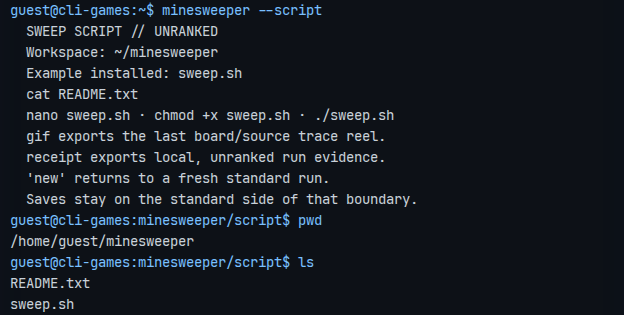 A scripting tier starts with files you can inspect, edit, and run in place.
Use the starter filename from the table. vim and vi are also available.
The workspace preparation step creates missing supplied files but preserves files the player has already edited. An executable run resets the selected game fixture or board; it does not replace the script on disk.
Read that game's README.txt before treating the general pattern here as an
API contract. Sensors, actions, coordinates, exit statuses, reset behavior,
fixture selection, limits, and success conditions belong to the game.
What should I script?
Start by replacing one weak or unfinished decision in the supplied file. The starter is intentionally close enough to running that the first useful change can remain small.
| Workspace | First useful question |
|---|---|
| Minesweeper Sweep Script | Can the starter name all four corners using LAST_ROW and LAST_COL rather than one board size? |
| ShiftSum Register Policy | Can visible lane and column sums choose a better ring and direction than the round-robin baseline? |
| Tenfold Packing Policy | Can grid shape and legal placements improve on the runnable first-fit choice? |
| Radix Sort Policy | Can the script choose its source and destination from scan and legal output? |
| Solitaire Reveal Policy | Can visible legal moves reduce work across both draw-one and draw-three fixtures? |
| P-Squash Script Lab | Can exit status and adjacent state replace the starter's fixed directional preference? |
| Blockfall Stack Trace | Can scans select shifts, rotations, and releases for each action-stepped yard? |
| Termiclanker Factory Workbench | Can small robot actions become reusable functions and policies across later systems? |
| Mandate Doctrine Workbench | Can a durable policy act on delayed reports while preserving room for a manual countermand? |
Run the supplied file once before optimizing it. That establishes the current behavior and shows whether the next edit improved the same case or merely changed it.
Read sensors and exit status
Automation sensors generally provide machine-readable text, conventional exit status, or both. That allows normal shell composition:
if exact; then
  commit
fichoice=$(legal | head -n 1)
[ -n "$choice" ] || exit 1
The exact commands above belong to ShiftSum and the policy-lab family; they are examples of the pattern, not universal game commands. Use the current workspace README for accepted arguments.
Common shell tools include variables, tests, loops, functions, pipelines,
redirection, and supported text tools such as grep, cut, sed, awk,
head, tail, wc, and jq. A bounded game host may still reject unsupported
Linux behavior. Treat its errors and README as the authority for that runtime.
Compare a completed run
Completed automation runs report game-specific metrics plus shared measures such as source bytes and semantic operations. Applicable workspaces compare a clear with saved account bests and render a histogram.
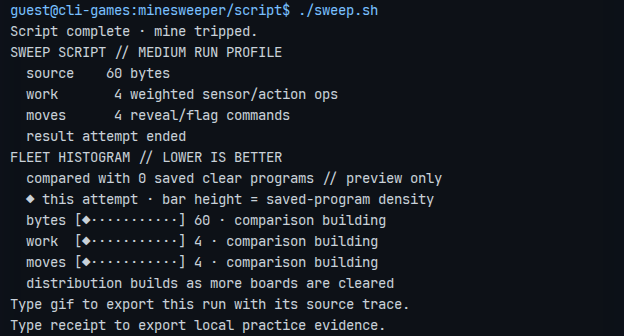 The result makes both the outcome and the cost of the script visible.
The metric direction is printed with the result. Do not assume that every number is a score or that higher is always better. For example, a packing policy may prefer a smaller final footprint while another game measures moves, shifts, ticks, hops, or released loads.
These comparisons are practice feedback. They are not a global leaderboard.
Export a GIF or local receipt
After a completed run, use the commands named by the workspace:
gif
receipt
gif exports a replay-backed visual trace with a small source window so the
result can be understood outside the live terminal.
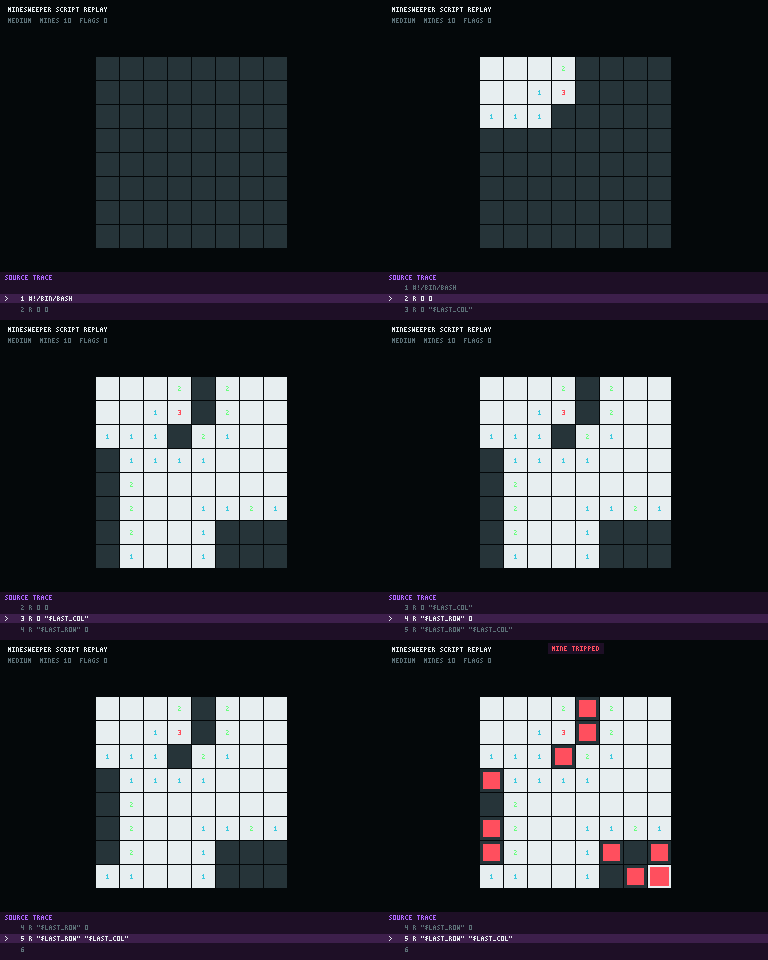 The exported GIF pairs the changing board with the source line responsible for each action.
receipt exports JSON identifying the game, mode, ruleset, engine, scenario,
script digest, timing, outcome, operations, metrics, and replay digest. It is
portable inspection evidence, but its evidence block deliberately says:
verification: local
competitiveEligible: false
scope: practice
The terminal summarizes the same boundary as “Locally observed · unranked · not server verified.”
Request server proof
ShiftSum, Tenfold, Radix, and Solitaire currently expose a prove command
after a completed policy-lab fixture:
prove
Proof requires a registered account. The server receives the submitted policy source, checks it against the pinned pack identity, and replays it twice across five fixed fixtures under bounded limits. A successful request stores the proof receipt and returns a public share path. The source itself is processed transiently and is not retained.
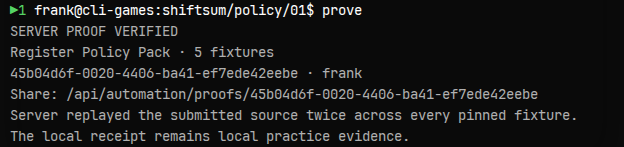 Server proof means the pinned pack was replayed reproducibly; it is not an automation rank.
The receipt records the player, source digest and byte count, pack and engine identity, limits, per-fixture outcomes and metrics, and the exact-match replay result.
Server proof demonstrates that the submitted source completed that versioned pack reproducibly. It does not currently assign a public automation rank.
How ranking works
It does not currently apply to automation tiers.
- Standard game runs keep their existing manual ranking rules.
- Script-mode results set competitive eligibility to false.
- Local histograms compare practice measurements and account bests.
- Local receipts are inspectable but not server authority.
- Four server proof packs issue stronger shareable evidence.
- There is no global proof-pack leaderboard yet.
This separation prevents an automated run from changing the meaning of an ordinary manual score while leaving room for a future competition designed specifically around versioned policies.
Minesweeper coordinate example
Minesweeper keeps the same row-column grammar in direct and scripted play:
r ROW COL
f ROW COL
Its starter exports ROWS, COLS, LAST_ROW, and LAST_COL. The first reveal
is guaranteed safe because mines are placed afterward. Other hidden cells have
the same mine probability; a corner has fewer neighboring cells but is not
itself safer.
The supplied file begins with:
r 0 0TODO: reveal the top-right corner with LAST_COL
TODO: reveal the bottom-left corner with LAST_ROW
TODO: reveal the bottom-right corner with LAST_ROW and LAST_COL
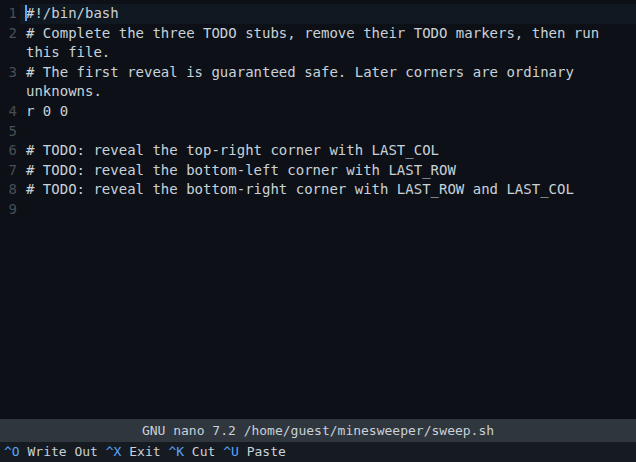 Replace the three stubs with commands that use the supplied boundary variables.
Complete the three commands, remove the TODO markers, make the file executable, and run it. That is a starter exercise in packaging repeated coordinates, not a claim that four corners solve or optimize the game.
Troubleshoot a script
- The file will not run: inspect it with
ls -l, add execute permission
chmod +x FILE, and invoke it as ./FILE.
- The editor opened the wrong path: return to the supplied workspace and
README.txt.
- A policy loops forever: add a status condition, inspect exit codes, and
- A command works in another game: sensors and actions are scoped to the
- A run changed but the histogram did not improve: confirm the run reached
proveis absent: only the four fixed policy packs listed above currently
proveasks for registration: local practice remains available, but